Warning: realpath(): open_basedir restriction in effect. File(/home/platne/serwer404358/public_html/autoinstalator/mhyrlik.pl) is not within the allowed path(s): (/home/platne/serwer404358/public_html/autoinstalator/mhyrlik.pl/wordpress144116/:/home/platne/serwer404358/tmp/:/home/virtuals/mhyrlik.pl/:/usr/local/php84-fpm/lib/php/:/tmp:/home/tmp:/var/lib/php5) in /home/platne/serwer404358/public_html/autoinstalator/mhyrlik.pl/wordpress144116/wp-content/plugins/wp-file-manager/classes/backup-storage.php on line 119

Warning: realpath(): open_basedir restriction in effect. File(/home/platne/serwer404358/public_html/autoinstalator) is not within the allowed path(s): (/home/platne/serwer404358/public_html/autoinstalator/mhyrlik.pl/wordpress144116/:/home/platne/serwer404358/tmp/:/home/virtuals/mhyrlik.pl/:/usr/local/php84-fpm/lib/php/:/tmp:/home/tmp:/var/lib/php5) in /home/platne/serwer404358/public_html/autoinstalator/mhyrlik.pl/wordpress144116/wp-content/plugins/wp-file-manager/classes/backup-storage.php on line 119

Warning: realpath(): open_basedir restriction in effect. File(/home/platne/serwer404358/public_html) is not within the allowed path(s): (/home/platne/serwer404358/public_html/autoinstalator/mhyrlik.pl/wordpress144116/:/home/platne/serwer404358/tmp/:/home/virtuals/mhyrlik.pl/:/usr/local/php84-fpm/lib/php/:/tmp:/home/tmp:/var/lib/php5) in /home/platne/serwer404358/public_html/autoinstalator/mhyrlik.pl/wordpress144116/wp-content/plugins/wp-file-manager/classes/backup-storage.php on line 119

Warning: realpath(): open_basedir restriction in effect. File(/home/platne/serwer404358) is not within the allowed path(s): (/home/platne/serwer404358/public_html/autoinstalator/mhyrlik.pl/wordpress144116/:/home/platne/serwer404358/tmp/:/home/virtuals/mhyrlik.pl/:/usr/local/php84-fpm/lib/php/:/tmp:/home/tmp:/var/lib/php5) in /home/platne/serwer404358/public_html/autoinstalator/mhyrlik.pl/wordpress144116/wp-content/plugins/wp-file-manager/classes/backup-storage.php on line 119

Warning: realpath(): open_basedir restriction in effect. File(/home/platne) is not within the allowed path(s): (/home/platne/serwer404358/public_html/autoinstalator/mhyrlik.pl/wordpress144116/:/home/platne/serwer404358/tmp/:/home/virtuals/mhyrlik.pl/:/usr/local/php84-fpm/lib/php/:/tmp:/home/tmp:/var/lib/php5) in /home/platne/serwer404358/public_html/autoinstalator/mhyrlik.pl/wordpress144116/wp-content/plugins/wp-file-manager/classes/backup-storage.php on line 119

Warning: realpath(): open_basedir restriction in effect. File(/home) is not within the allowed path(s): (/home/platne/serwer404358/public_html/autoinstalator/mhyrlik.pl/wordpress144116/:/home/platne/serwer404358/tmp/:/home/virtuals/mhyrlik.pl/:/usr/local/php84-fpm/lib/php/:/tmp:/home/tmp:/var/lib/php5) in /home/platne/serwer404358/public_html/autoinstalator/mhyrlik.pl/wordpress144116/wp-content/plugins/wp-file-manager/classes/backup-storage.php on line 119
Collection-Workboard - SaaS system - Mateusz Hyrlik | Projektowanie stron www

UX/UI Case Study

Visual Collection Workboard
for a SaaS PLM System

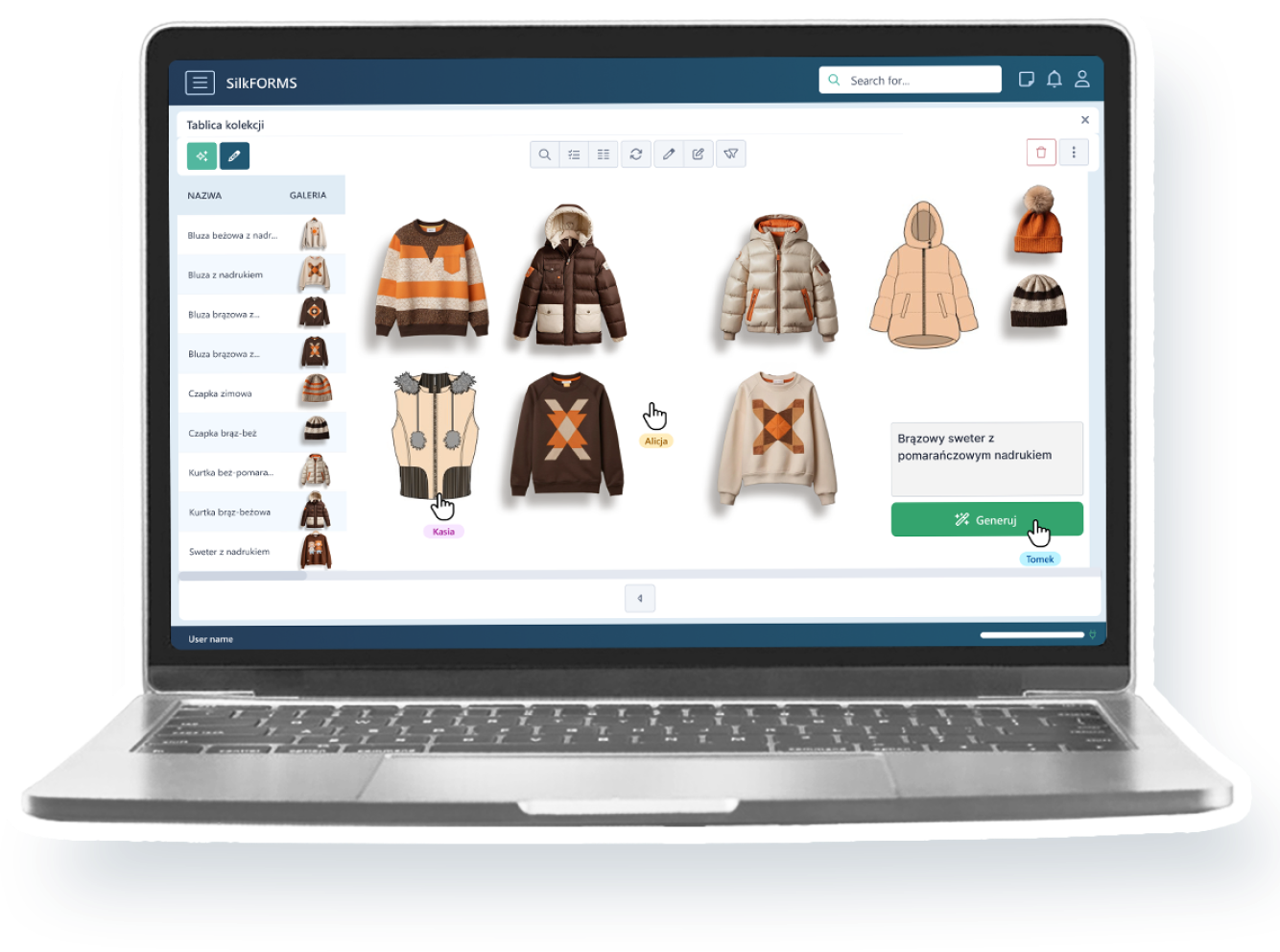
I designed a visual workspace that allowed fashion and retail teams to organize projects, inspirations, product images and AI-generated concepts directly within a SaaS PLM platform.

01 / CONTEXT

Project Overview

SilkPLM is a B2B SaaS platform supporting fashion, home decor and retail teams in managing products, collections and related development data.

The Collection Workboard was designed as a visual workspace where designers and other product teams could organize inspirations, projects, product images and AI-generated concepts without leaving the PLM environment.

The project extended an existing product, so the solution had to work with SilkPLM’s architecture, design system and available development resources. Selected parts of the concept were later implemented in the platform.

Role UI/UX Designer
Project type B2B SaaS / PLM feature
Audience Designers, technologists and retail teams
Scope User flow, feature concept and interface design
Collaboration Project Manager, fashion specialist and developers
Project status Partially implemented
02 / PROBLEM

The Challenge

SilkPLM provided structured product and collection data, but teams lacked a flexible visual space for organizing inspirations, projects and product concepts within the platform.

01

Fragmented visual workflow

Inspirations, product images and collection ideas were stored across different tools, making it difficult to see the full creative context in one place.

02

Frequent tool switching

Designers had to move between the PLM system and external visual tools such as Miro or Canva, which interrupted the workflow and separated creative decisions from product data.

03

Disconnected product context

Projects, inspirations and generated assets needed to remain connected with the products and collections already managed inside SilkPLM.

04

Product and development constraints

The new feature had to fit the existing system architecture, interface patterns and design system while remaining realistic for a startup development team.

03 / CONTRIBUTION

My Role & Collaboration

I worked as a UI/UX Designer responsible for translating the initial product idea into a structured workflow and interface that could become part of the existing SilkPLM platform.

My contribution covered
  • Mapping the main paths for creating and using collection workboards.
  • Preparing early concepts, user flows and high-fidelity interface screens.
  • Connecting the workboard concept with existing projects, inspirations and product data.
  • Reusing SilkPLM components and adapting the feature to the existing product architecture.
  • Reviewing concepts with the Project Manager, fashion specialist and development team.
01

Workflow design

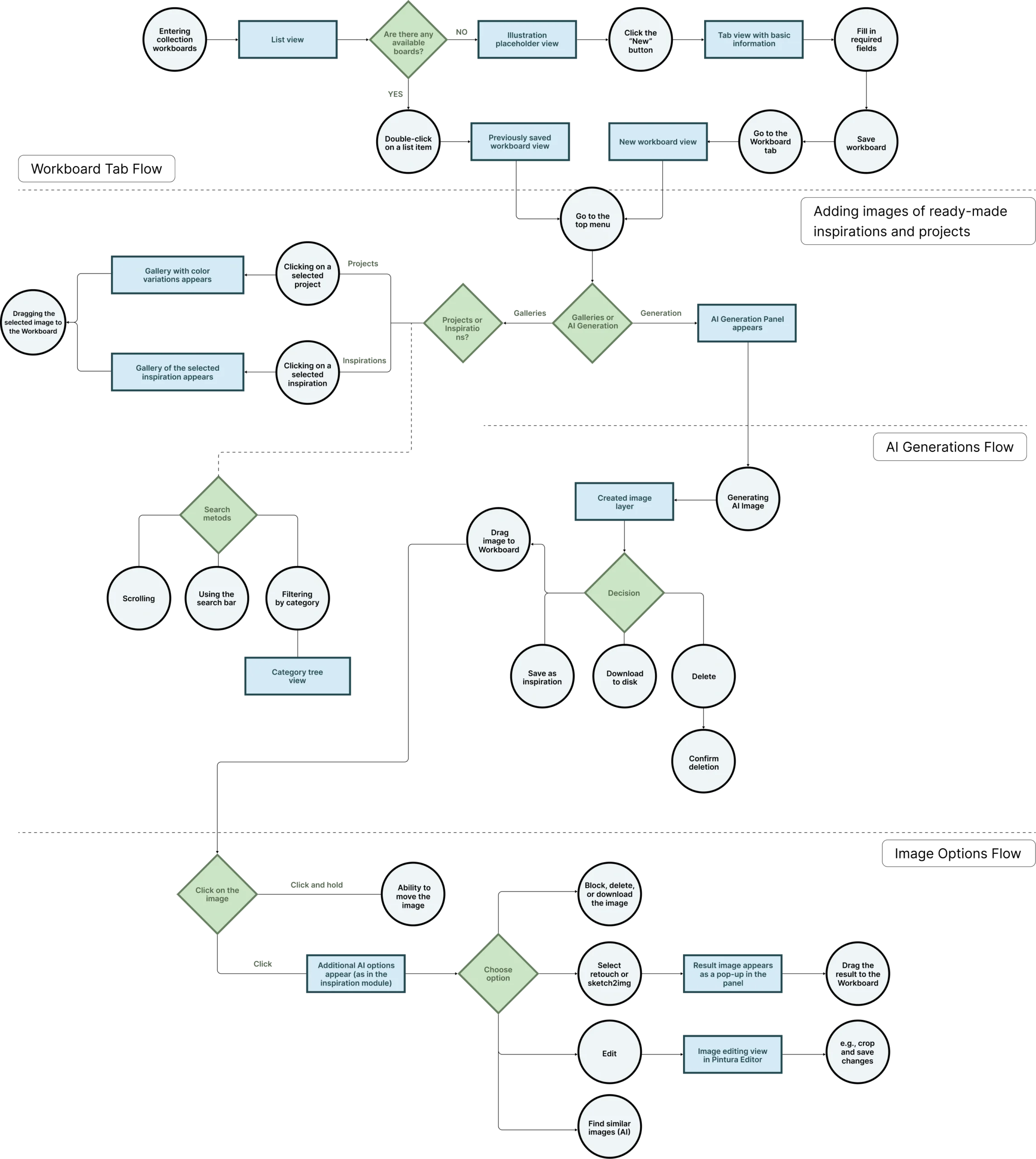
I mapped how users could create a workboard, add content, access existing materials and manage selected items on the visual canvas.

02

Interface design

I designed the main workboard views, contextual image actions, supporting panels and connections with other areas of SilkPLM.

03

Stakeholder collaboration

I reviewed the feature with the Project Manager and a fashion specialist, then discussed technical feasibility with developers.

04

AI workflow contribution

I contributed to designing and testing AI-related flows in SilkPLM, including the AI Pattern Generator. The technical AI integration was outside my role.

04 / DISCOVERY

Research & Validation

The discovery process combined competitor analysis, internal domain knowledge and iterative reviews with product and development stakeholders.

01
Competitive analysis

Familiar workspace patterns

I reviewed visual workspace patterns used in products such as Miro and Canva, focusing on canvas interaction, adding content, contextual actions and organizing visual materials.

02
Domain expertise

Fashion workflow knowledge

A fashion specialist provided practical knowledge about how collection teams work with products, references and inspirations. This helped define the content users needed on the workboard.

03
Stakeholder review

Product direction and priorities

The Project Manager reviewed the feature concept and supported the definition of requirements, priorities and connections with other parts of the SilkPLM platform.

04
Technical feasibility

Iterative development reviews

I discussed selected interactions with developers and refined the designs according to the existing architecture, available components and implementation constraints.

Key insights

The workboard needed to be connected, not treated as an isolated canvas.

01

Projects, products and inspirations should remain available inside the visual workspace.

02

Familiar drag-and-drop patterns could reduce the learning curve.

03

AI-generated materials should support an existing collection workflow instead of becoming a separate destination.

04

Reusing the existing design system would make the feature more realistic to implement.

Validation scope:

The concepts were reviewed internally by the Project Manager and fashion specialist. This provided product and domain-expert feedback, but it was not a formal usability study with end users.

05 / FLOW STRUCTURE

User Flow

06 / EARLY CONCEPT

From Flow to First Concept

After mapping the main user paths, I prepared an early workboard concept to communicate the feature direction and discuss how a visual workspace could fit into the existing SilkPLM platform.

At this stage, the focus was on information structure, access to collection materials and the relationship between the canvas and supporting tools—not on final visual details.
This stage helped define
  • A central visual canvas for collection materials.
  • Access to projects and inspirations from the workboard.
  • Side panels for adding and managing visual content.
  • Contextual actions displayed after selecting an item.
Early low-fidelity concept of the SilkPLM Collection Workboard
The early concept focused on the feature structure and interaction model before the interface was refined using the SilkPLM design system.
Design progression

Feedback from the Project Manager and fashion specialist helped me refine the feature scope before moving to detailed interface design and technical discussions with developers.
06 / SOLUTION

Selected Interface Screens

The final concept brought collection materials, project data, inspirations and AI-assisted content into one visual workspace.

Instead of moving between the PLM system and external tools, users could access existing materials, place them on the canvas and manage selected items without losing the product context.

SCREEN 01

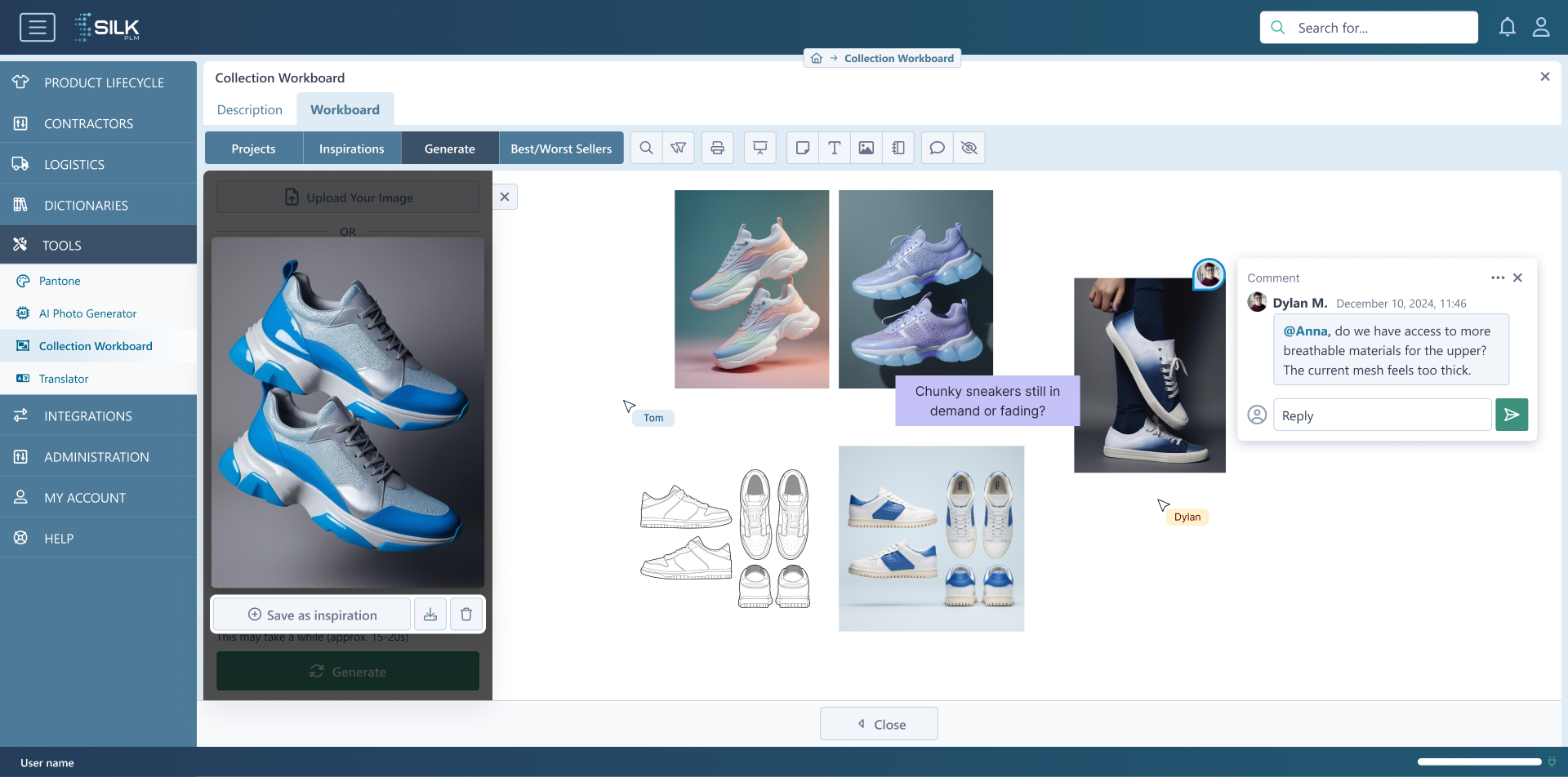
Default Workboard

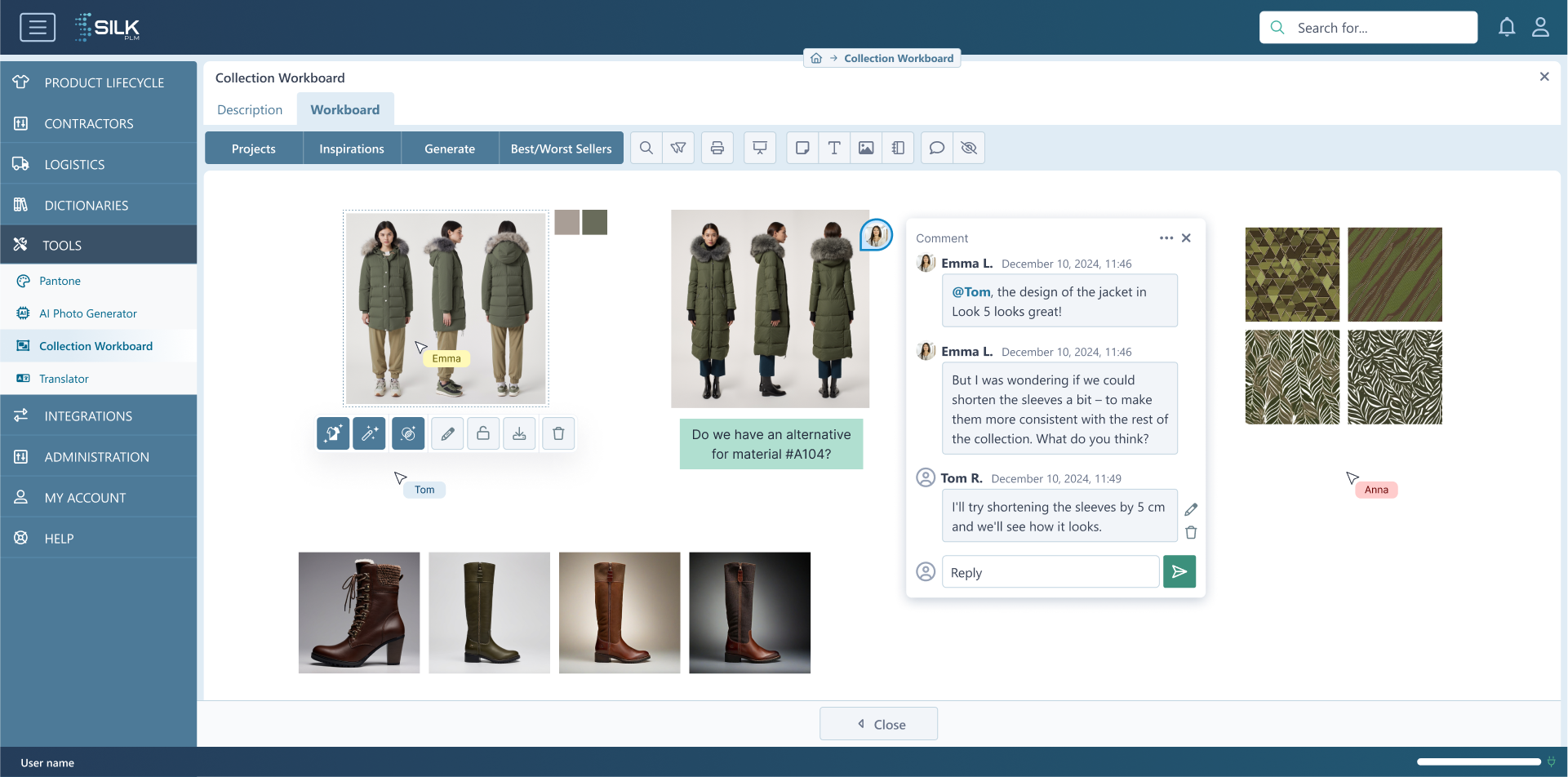
The main workboard provided an open canvas where users could visually organize collection materials by dragging, positioning and grouping images according to their needs.

Contextual controls appeared after selecting an item, keeping the default workspace focused while providing access to additional actions when needed.

The default view combined the visual canvas with existing SilkPLM navigation, collection tabs and collaboration features.

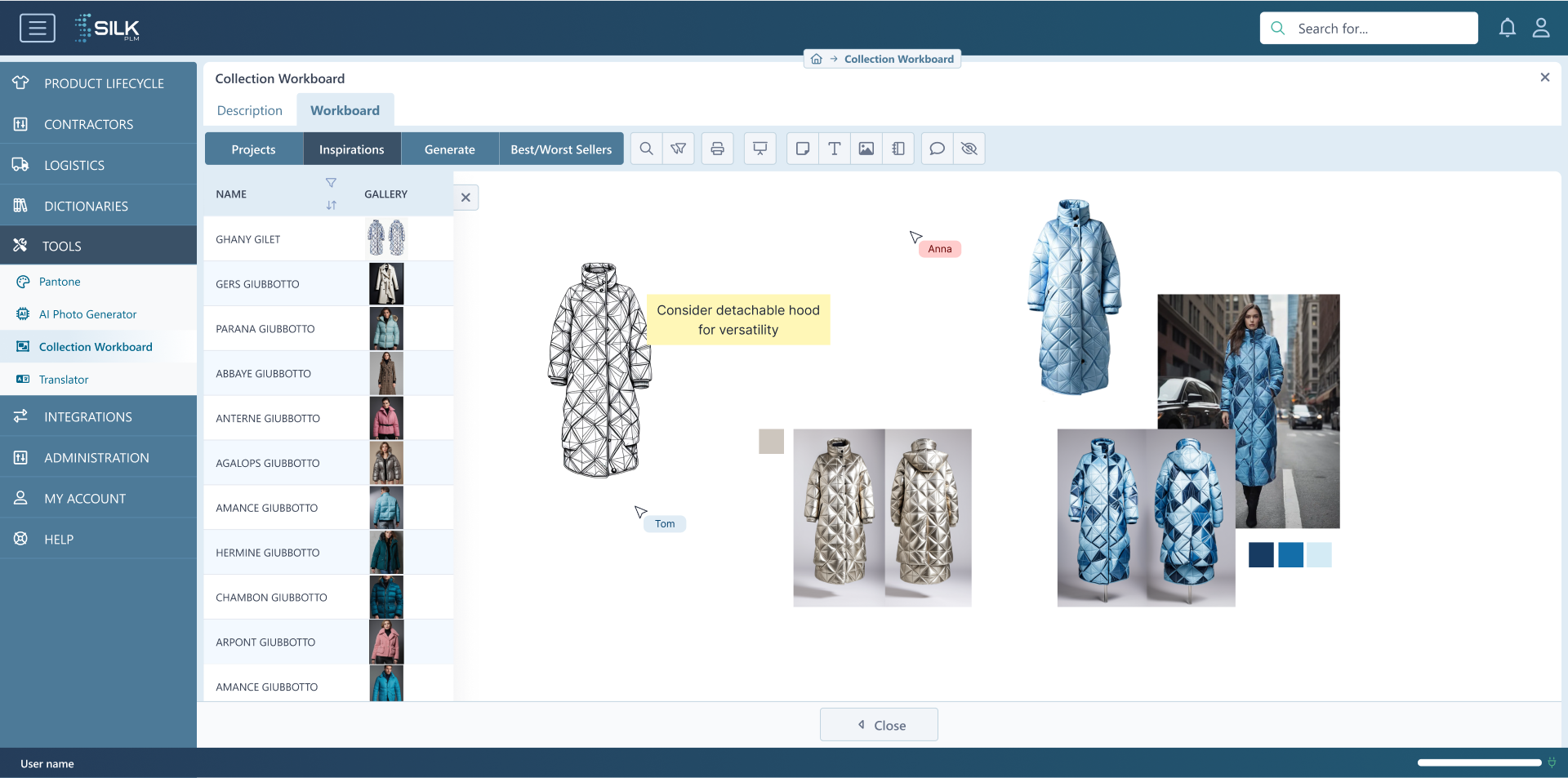
SCREEN 02

Projects and Inspiration Galleries

Users could browse projects and inspiration galleries already available in SilkPLM without leaving the workboard.

After selecting an item, they could drag its images directly onto the canvas and position them alongside other collection materials. This connected visual exploration with structured project data.

Existing projects and inspirations could be reused directly instead of being exported and uploaded again.

SCREEN 03

AI-Assisted Inspiration

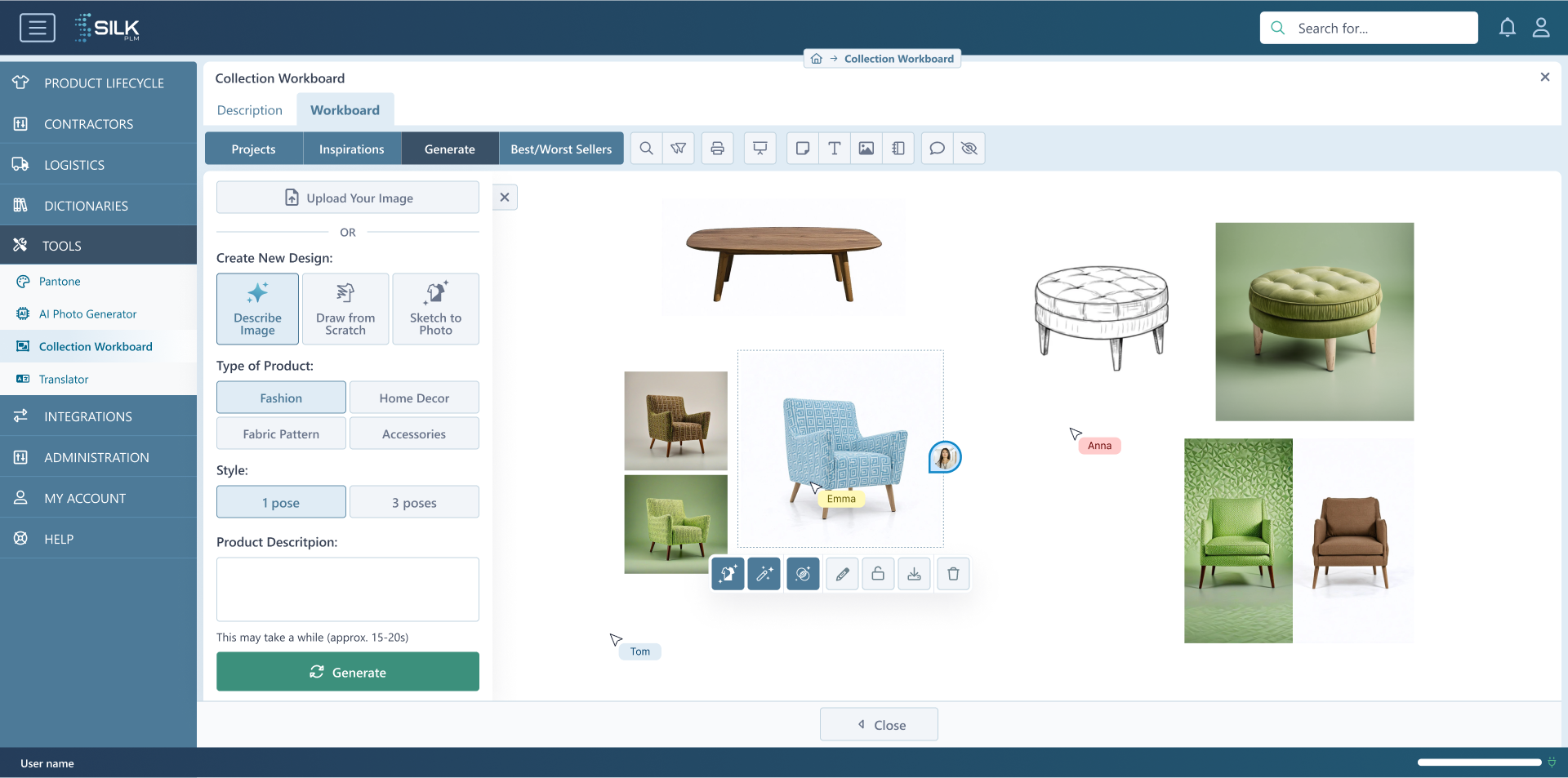
The concept also provided access to AI generation tools available within the SilkPLM product ecosystem.

Users could define generation settings, review generated results and add selected images to the workboard or save them as inspirations for later use.

My contribution focused on designing and testing AI-related user flows. The technical integration of AI services was outside my role.

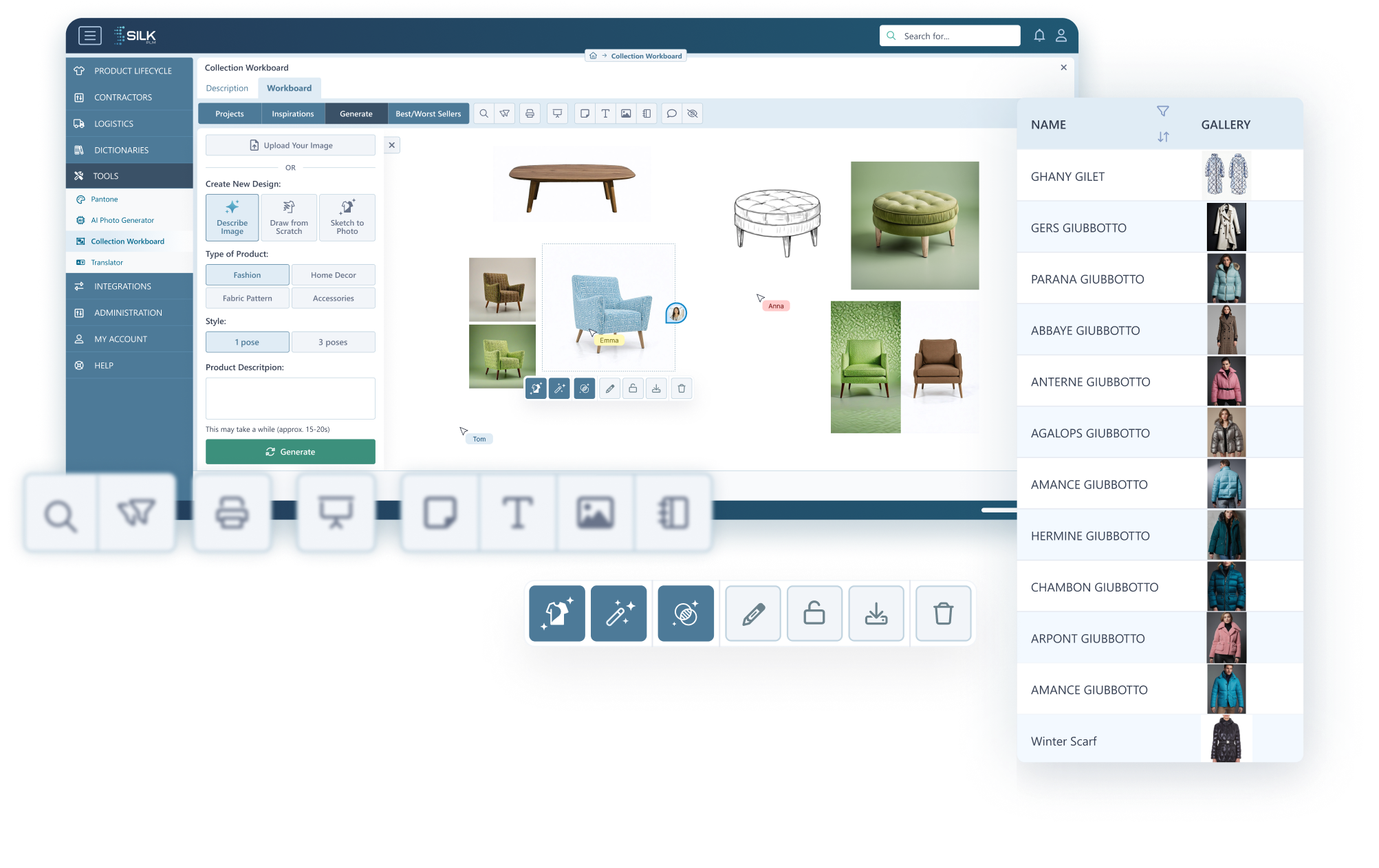
SCREEN 04

Contextual Image Actions

When an image was selected, the interface displayed actions relevant to that item.

Depending on the content, users could reposition the image, access its options, add comments, save it as inspiration, download it or remove it from the workboard.

Contextual actions reduced interface clutter by displaying additional controls only when an object was selected.

08 / DESIGN DECISIONS

Key UX Decisions

The interface decisions focused on connecting visual exploration with existing product data, reducing unnecessary tool switching and keeping a complex workspace understandable.

01

Connected workspace

The workboard was designed as part of the PLM ecosystem rather than as an isolated canvas. Users could access projects, inspirations and collection data from the same workspace.

02

Reuse of existing content

Materials already stored in SilkPLM could be added directly to the board, reducing the need to export, download and upload the same assets between different applications.

03

Direct manipulation

Drag-and-drop interaction allowed users to add and organize visual materials in a way that was familiar from other canvas-based tools.

04

Contextual controls

Image actions appeared after selecting an item. This kept the canvas focused while making editing, comments and asset options available when they were relevant.

05

Consistent SaaS patterns

Existing navigation, components and visual patterns were reused to reduce the learning curve and make the feature more realistic for the development team to implement.

06

AI within the workflow

AI-generated content was treated as another source of inspiration within the collection process instead of becoming a separate, disconnected product area.

Recruiter takeaway

These decisions show how I balanced user needs, domain requirements, existing product architecture and startup development constraints while designing a complex B2B SaaS feature.

09 / OUTCOME

Outcome & Implementation

The project established a structured direction for a visual collection workspace integrated with the existing SilkPLM product. Selected parts of the concept were implemented, while the broader solution remained a direction for further product development.

Project outcome
  • A complete user flow covering workboard creation, content selection and image management.
  • High-fidelity interface concepts connected with the existing SilkPLM navigation and design system.
  • Defined connections between the workboard, projects, inspiration galleries and AI-assisted content.
  • Internal validation with the Project Manager and fashion specialist.
  • Technical reviews with developers and partial implementation within the product.
01

Structured feature direction

The project translated an initial idea into a documented workflow, interface concept and set of interactions that could be discussed and prioritized by the product team.

02

Connected product workflow

The concept connected visual collection work with projects, inspirations and content already available inside the PLM system.

03

Development-aware design

Reusing existing product components and discussing feasibility with developers helped keep the solution aligned with the platform’s architecture and available resources.

04

Partial implementation

Selected elements of the concept were implemented in SilkPLM. The remaining flows and interface ideas created a foundation for further development of the feature.

Evidence and limitations

What I can responsibly claim

The project was reviewed internally and partially implemented, but I do not have verified quantitative usage or business metrics. Therefore, I evaluate the outcome through the completeness of the workflow, stakeholder feedback and its connection with the existing product architecture.

Formal usability testing with target end users was not part of the project scope.

10 / REFLECTION

Key Learnings

This project helped me better understand how to introduce a complex feature into an existing B2B SaaS product while balancing user needs, domain knowledge, technical feasibility and startup constraints.

01

Domain knowledge shapes better flows

Collaboration with a fashion specialist helped reveal workflow requirements that would have been difficult to identify through competitor analysis alone.

02

Existing systems define real constraints

Designing a new SaaS feature requires understanding how it connects with existing navigation, product data, components and technical architecture.

03

Design systems support implementation

Reusing established UI patterns reduced unnecessary design work, improved consistency and made selected parts of the concept more realistic to implement.

04

AI should support a real task

AI-generated content created more value when it became part of the collection workflow instead of functioning as a separate, disconnected feature.

Final takeaway

The project strengthened my ability to turn an early product idea into a structured user flow and interface concept, collaborate with specialists and developers, and make design decisions within the realities of an evolving startup product.